

The console and saved queries
A console is a SQL editor tied to one connection. Open one with New Console from a connection’s menu in the Database Explorer, or New Console Here on a connection or object. The first time you connect to a connection after starting DataKlin, a console opens for it if it has none. Text in a console you never saved is kept across restarts.
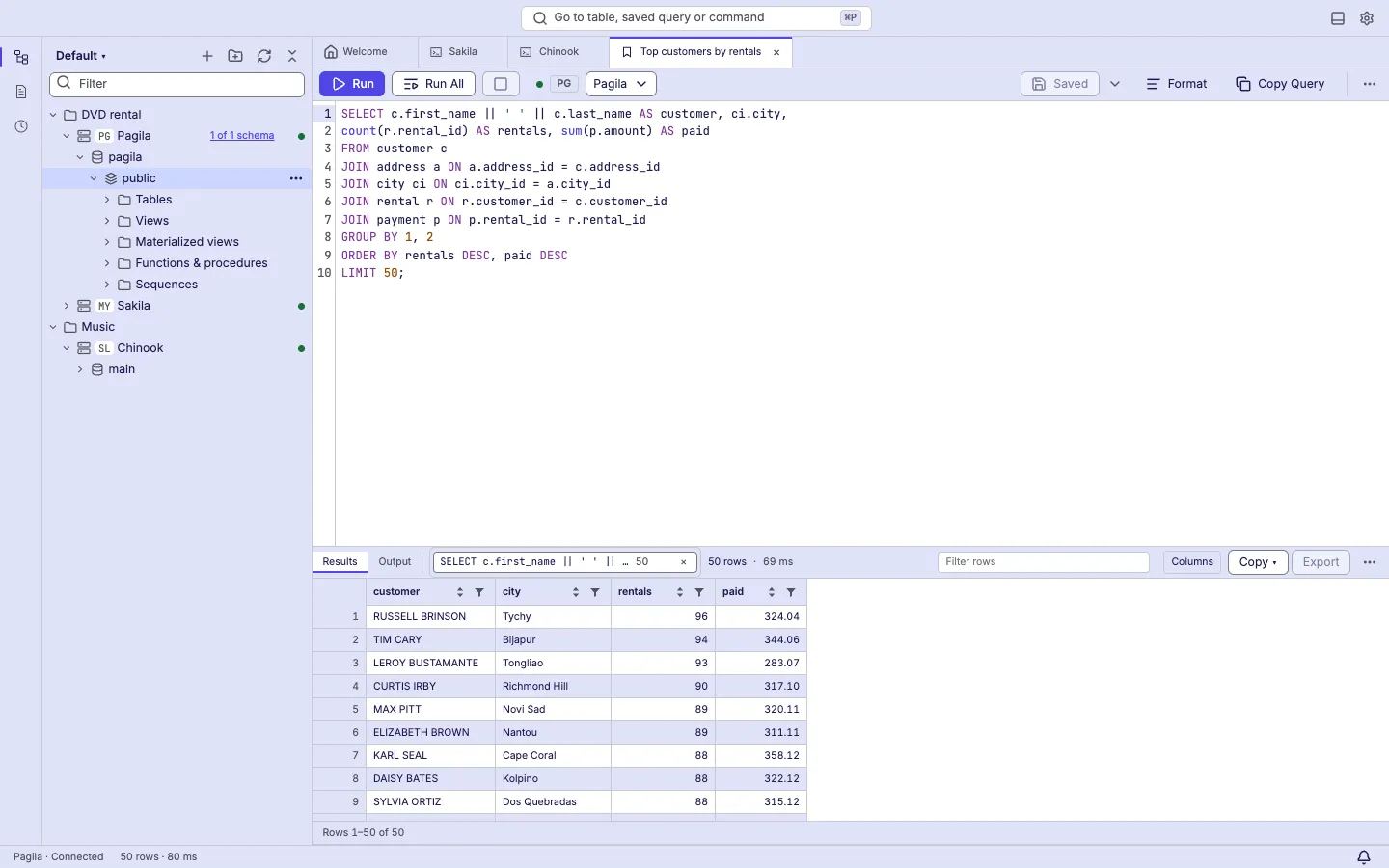
The toolbar
Section titled “The toolbar”From left to right:
- Run runs the statement at the cursor, or the selected text. Press Ctrl+Enter (Cmd+Enter on macOS).
- Run All runs every statement in the console. Press Ctrl+Shift+Enter (Cmd+Shift+Enter on macOS).
- Cancel is available only while a statement runs, and shows the time so far. Press Ctrl+. (Cmd+. on macOS) to cancel. DataKlin asks the server to cancel and tells you whether it was cancelled or had already finished. If the server hasn’t confirmed after 10 seconds, DataKlin offers Close session.
- The connection chip shows the connection’s state dot, its engine and name. Click it to run the console on another connection. The schema chip next to it picks the schema, and an environment badge shows the connection’s environment.
At the right:
- Save, with an arrow for more (see below).
- Format formats the statement at the cursor, or the selection.
- Copy Query copies the editor’s text. The button reads Copied for a moment.
- ⋯ has Show History for this console, Open SQL File… and Save to File….
A connection’s state shows in the dot on the chip and in the status bar, and nowhere else in the toolbar.
Word wrap
Section titled “Word wrap”The Word wrap button in the toolbar turns wrapping of long lines on or off, so a long query wraps onto the next row instead of running past the edge. View › Word Wrap, Alt+Z (Option+Z on macOS), the command center and Settings › Appearance › Word wrap do the same. It applies to every console, wrapped rows keep the line’s indentation, and it is off by default.
Completion
Section titled “Completion”As you type, the console suggests what fits at the cursor. In a PostgreSQL, MySQL, SQLite or Cassandra console that means tables, columns, aliases and join conditions from foreign keys, plus keywords and functions with their signatures; functions your server’s version doesn’t have are left out. The Redis, MongoDB, Elasticsearch and OpenSearch consoles suggest their own commands and query words. Press Ctrl+Space to ask for suggestions at any time, Tab or Enter to accept one and Escape to close the list. Settings › Console controls when suggestions appear.
Save a query
Section titled “Save a query”- Click Save, press Ctrl+S (Cmd+S on macOS), or choose File › Save Query.
- A small window opens under the button. Name is filled in from the first words of your SQL and selected. It says Saved under the console’s connection.
- Press Enter. Escape cancels.
The tab takes the query’s name and a saved-query icon, and the button reads Saved for a moment. If a saved query with that name already exists on the connection, DataKlin asks once: Replace saved query “name”? Replace isn’t the default button.
When you edit a saved query, a dot shows on its tab. Save writes the change at once, with no window, and is off while nothing has changed.
The arrow on the Save button opens:
- Save
- Save As…, Ctrl+Shift+S (Cmd+Shift+S on macOS), to keep it under a new name
- Rename…
- Revert Changes
- Save to File…, to save the console to a
.sqlfile instead - Reveal in Saved Queries
Closing with unsaved changes
Section titled “Closing with unsaved changes”DataKlin never asks a question when you close a saved query’s tab that has unsaved changes. It closes at once and shows a toast: Closed “name” with unsaved changes, with Reopen for 10 seconds. Reopen Closed Tab Ctrl+Shift+T (Cmd+Shift+T on macOS) also brings the tab back with your edits.
Saved queries
Section titled “Saved queries”The Saved Queries view on the activity rail lists the current workspace’s saved queries, by connection. It works without connecting.
- The header has New Query, Collapse All and a filter: type to find a query.
- A row shows Open and Run and a ⋯ menu when you hover or focus it. The menu has Open, Open and Run, Rename…, Copy Query, Move to… and Delete. A delete can be undone.
- Drag a query onto another connection’s group to move it there.
- With none saved, the view says No saved queries yet. Use the Save button in a console to keep one here.
Deleting a connection deletes its saved queries too, and the delete dialog says so. See Workspaces and saved queries.
Failed statements and the Output
Section titled “Failed statements and the Output”When a statement fails, the console’s Output shows the error, and Copy Details copies it. Copy Statement at Caret in the command center copies the statement the cursor is in.
If the connection was dropped, or you disconnected it, Run connects again first, and the button reads Reconnecting…. If a transaction was open when it dropped, the statement doesn’t run: the server rolled the transaction back, and DataKlin says so and offers Reconnect. DataKlin never replays a write on its own.