

Elasticsearch
DataKlin connects to Elasticsearch 8 and 9 through its built-in Elasticsearch connector: one node, several nodes, a load balancer or an Elastic Cloud deployment. It signs in with a user name and password, an API key, a bearer token, a client certificate or no credentials, and the URL scheme decides TLS: https uses the TLS mode you choose, and http is not encrypted.
Supported versions Elasticsearch 8 and 9
- TLS
- Client certificates
- Request console completion
Connect
Section titled “Connect”-
Open New Connection. Click New Connection in the header of the Database Explorer, choose File › New Connection…, or press Ctrl+K, then Ctrl+N (Cmd+K, then Cmd+N on macOS). Getting started lists every way to open it.
-
Choose Elasticsearch. Type
elasticin Search connectors… and press Enter, or double-click Elasticsearch. For an OpenSearch cluster, see OpenSearch. -
Name the server. Use the URLs | Cloud ID switch to say how: type one or more Node URLs, or paste the Cloud ID of an Elastic Cloud deployment. See Connection fields.
-
Check Security. Open Security to choose the Authentication method and the TLS mode. See Authentication and TLS.
-
Test the connection. Click Test connection. When it works, the server version shows beside the button. When it doesn’t, the reason shows, with Copy details. Once the connection is saved, Show Connection Log shows the full log.
-
Save. Click Save, or Save and connect to connect at once. The connection appears in the Database Explorer.
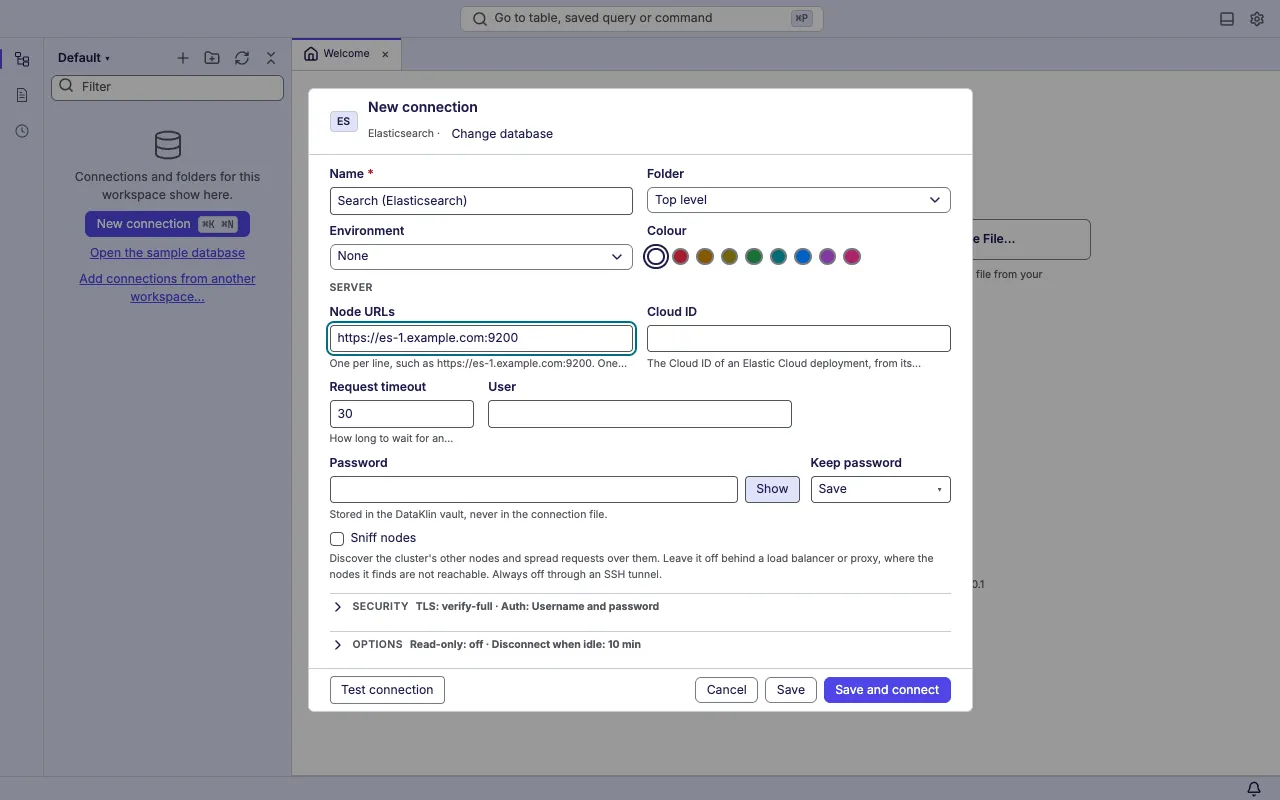
Connection fields
Section titled “Connection fields”The Connection section at the top (Name, Folder, Environment and a color) is the same for every database: see Getting started. The Server and Authentication fields below are Elasticsearch’s own. Options is the collapsed section at the bottom of the dialog.
Server
Section titled “Server”The URLs | Cloud ID switch shows one of the two ways to name the server. DataKlin refuses a connection that has both.
Type one Node URL per line, such as https://es-1.example.com:9200. One URL is enough for a single node or a cluster behind a load balancer. The scheme decides TLS: https uses the TLS mode in Security, and http needs Disable, so a URL that disagrees with Security is refused rather than changed. A node written without a scheme or a port takes them from the TLS mode, and the port is 9200.
Paste the Cloud ID from the overview page of your Elastic Cloud deployment. It names the deployment’s endpoint, so there is no URL to type.
| Field | What it does | Default | Example |
|---|---|---|---|
| Node URLs | One per line, such as https://es-1.example.com:9200. One URL is enough for a single node or a cluster behind a load balancer. At most 8,192 characters. | None | https://es-1.example.com:9200 |
| Cloud ID | The Cloud ID of an Elastic Cloud deployment, from its overview page. At most 1,024 characters. | None | dataklin-demo:ZXhhbXBsZQ== |
| Request timeout | How long to wait for an answer, in seconds. From 1 to 3600. | 30 | 60 |
| Sniff nodes | Discover the cluster's other nodes and spread requests over them. Leave it off behind a load balancer or proxy, where the nodes it finds are not reachable. Always off through an SSH tunnel. | Off | Off |
Authentication
Section titled “Authentication”| Field | What it does | Default | Example |
|---|---|---|---|
| UserUsername and password | The Elasticsearch user to sign in as. At most 1,024 characters. | None | elastic |
| PasswordUsername and password | Stored in the DataKlin vault, never in the connection file. | None | — |
| API keyAPI key | The encoded API key, or id:api_key. Stored in the DataKlin vault. | None | an encoded API key |
| TokenBearer token | A bearer token, such as an OAuth2 access token. Stored in the DataKlin vault. | None | an OAuth2 access token |
Options
Section titled “Options”| Field | What it does | Default | Example |
|---|---|---|---|
| Read-only | Mark this connection as one that should not change data. DataKlin then refuses writes and schema changes before they reach the database. Choosing a protected environment, such as Production, ticks it for you. | Off | On |
| Disconnect when idle | Close this connection after it has sat unused. Reconnects on your next action. Choose Use default, Never, or After… and a number of minutes. | Use default | Never |
Authentication and TLS
Section titled “Authentication and TLS”Open Security to choose how DataKlin signs in. The Authentication method is one of:
- Username and password: the User and Password fields. Passwords are kept as Secret storage describes.
- API key: an Elasticsearch API key, in its encoded form or as
id:api_key. - Bearer token: a token such as an OAuth2 access token.
- Client certificate: you sign in with a certificate the server trusts, chosen under the TLS settings.
- None: no credentials, for a node that doesn’t ask for them.
The TLS mode is one of Disable, Require, Verify CA and Full verification. A new connection uses Full verification, and the node URL’s scheme has to agree: https with a TLS mode, http with Disable. With TLS on you can also choose a CA certificate, a Client certificate, the Server name and the Minimum TLS version. TLS and certificates explains each mode and certificate.
Try it locally
Section titled “Try it locally”No cluster to hand? Start a single Elasticsearch node in Docker, with security off so there is nothing to sign in to:
docker run --name dataklin-elasticsearch -d -p 9200:9200 \ -e discovery.type=single-node -e xpack.security.enabled=false \ -e ES_JAVA_OPTS="-Xms512m -Xmx512m" \ docker.elastic.co/elasticsearch/elasticsearch:9.5.6Then connect with these values:
| Field | Value |
|---|---|
| Node URLs | http://localhost:9200 |
| Authentication method | None |
| TLS mode | Disable, because the URL is http |
The node takes a minute to start. When you’re done, remove the container with docker rm -f dataklin-elasticsearch.
Good to know
Section titled “Good to know”- Destructive requests ask first. A request that deletes an index, an alias or a data stream asks for confirmation before it runs, and so does
_delete_by_query. So does an_aliasesrequest with aremove_indexaction, which deletes an index even though the request line looks like a plainPOST. See Confirming destructive statements. - Only reads are retried. After a connection error DataKlin sends a
GETorHEADagain, and never any other request: it may have reached the node, and a confirmedDELETEmust not run twice. - Read-only connections. On a read-only connection, DataKlin refuses requests that write. See Read-only connections.
- Request language completion. The console completes the methods, endpoints and fields of a request as you type.
- Paging. Browsing an index and fetching more of a search walks the hits with a point in time, so the pages have no gaps or repeats, and DataKlin closes it afterwards.