

MongoDB
DataKlin connects to MongoDB 7.0 and later through its built-in MongoDB connector: a standalone server, a replica set, or a mongodb+srv:// cluster. It signs in with a user and password, a client certificate (X.509) or no authentication, and encrypts the connection with TLS: a new connection to a remote server uses Full verification, which checks that the server’s certificate comes from a trusted authority and names the server.
Supported versions MongoDB 7.0 and later
- TLS
- Connection string
- Replica sets
- Schema view
- Completion
Connect
Section titled “Connect”-
Open New Connection. Click New Connection in the header of the Database Explorer, choose File › New Connection…, or press Ctrl+K, then Ctrl+N (Cmd+K, then Cmd+N on macOS). Getting started lists every way to open it.
-
Choose MongoDB. Type
mongoin Search connectors… and press Enter, or double-click MongoDB. -
Choose Connection string or Fields. In the Server section, the Connection string | Fields switch picks how you describe the server. Paste a
mongodb://ormongodb+srv://string, or fill in Hosts, Port and the rest. Use one of the two, not both. See Connection fields. -
Check Security. Open Security to choose the Authentication method and the TLS mode. A remote host starts at Full verification;
localhostisn’t encrypted. Type the User and Password in the Authentication fields. See Authentication and TLS. -
Test the connection. Click Test connection. When it works, the server version shows beside the button. When it doesn’t, the reason shows, with Copy details. Once the connection is saved, Show Connection Log shows the full log.
-
Save. Click Save, or Save and connect to connect at once. The connection appears in the Database Explorer.
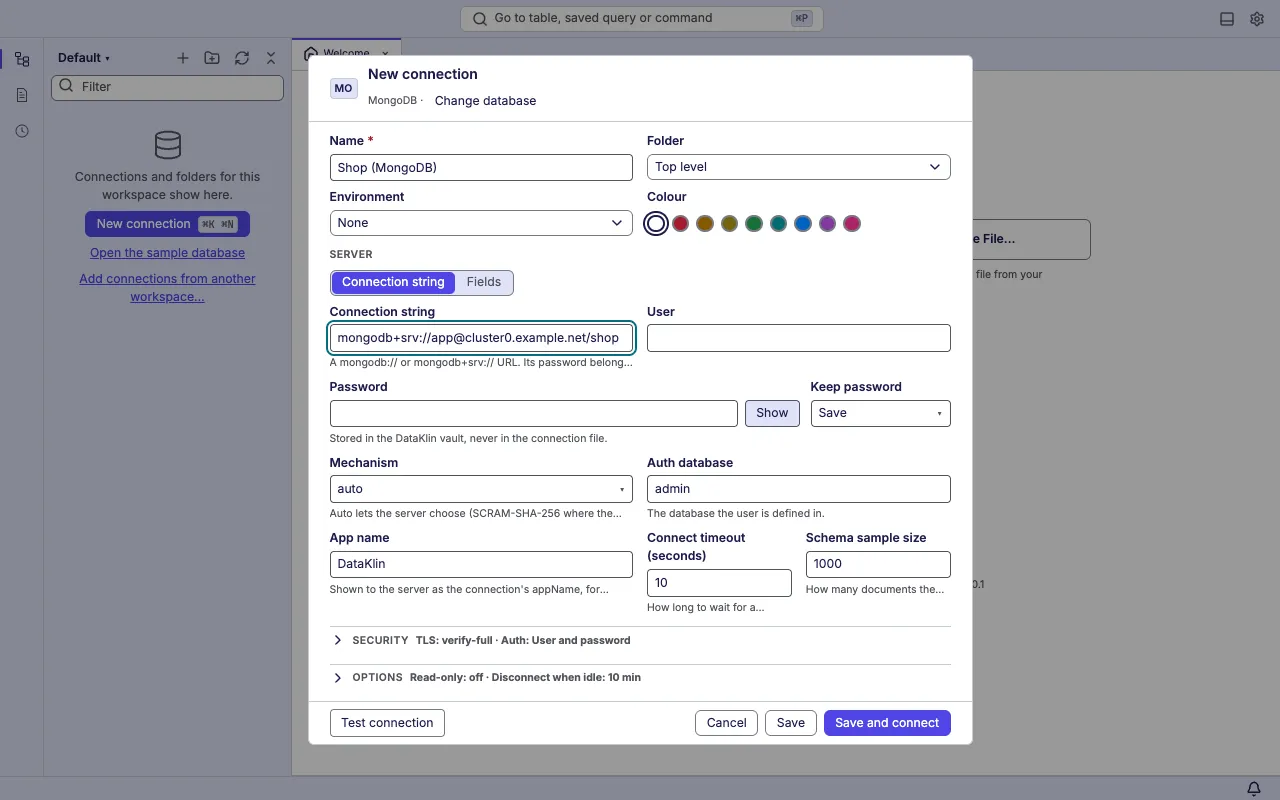
Connection fields
Section titled “Connection fields”The Connection section at the top (Name, Folder, Environment and a color) is the same for every database: see Getting started. The Server section has a Connection string | Fields switch, and each choice shows its own fields. Options is the collapsed section at the bottom of the dialog.
Server
Section titled “Server”One field holds the whole address, with the user and any options the connector reads in the string.
| Field | What it does | Default | Example |
|---|---|---|---|
| Connection string | A mongodb:// or mongodb+srv:// URL. Its password belongs in Password, which is kept in the vault. At most 2,048 characters. | None | mongodb+srv://app@cluster0.example.net/shop |
Separate fields for a server you can describe by its hosts.
| Field | What it does | Default | Example |
|---|---|---|---|
| Hosts | host:port, one per line or separated by commas. Hosts without a port use Port. At most 8,192 characters. | None | db-1.internal:27017 |
| Port | The port of hosts listed without one. From 1 to 65535. | 27017 | 27017 |
| Database | The database the console starts in. At most 64 characters. | None | shop |
| Replica set | The replica set's name, such as rs0. Empty: whatever the hosts report. At most 128 characters. | None | rs0 |
| Direct connection | Off: discover the replica set from the hosts. On: talk to the one host only (needed through an SSH tunnel). | Off | Off |
| Read preference | Which members reads go to. Primary sends every read to the primary; the others allow reads from secondaries. | primary | primary |
A connection uses a string or the fields. A string together with Hosts, Replica set or Database is refused.
Authentication
Section titled “Authentication”| Field | What it does | Default | Example |
|---|---|---|---|
| UserUser and password | The database user to sign in as. At most 1,024 characters. | None | app |
| PasswordUser and password | Stored in the DataKlin vault, never in the connection file. Next to it, Keep password chooses how long DataKlin keeps it: Save, Until DataKlin quits or Ask every time. | None | — |
| MechanismUser and password | Auto lets the server choose (SCRAM-SHA-256 where the user has it). | auto | auto |
| Auth databaseUser and password | The database the user is defined in. At most 64 characters. | admin | admin |
More settings
Section titled “More settings”| Field | What it does | Default | Example |
|---|---|---|---|
| App name | Shown to the server as the connection's appName, for example in $currentOp. At most 128 characters. | DataKlin | DataKlin |
| Connect timeout (seconds) | How long to wait for a server, also to select one of a replica set. From 1 to 3600. | 10 | 10 |
| Schema sample size | How many documents the Schema view samples with $sample. From 100 to 10000. | 1000 | 1000 |
Options
Section titled “Options”| Field | What it does | Default | Example |
|---|---|---|---|
| Read-only | Mark this connection as one that should not change data. DataKlin then refuses writes and schema changes before they reach the database. Choosing a protected environment, such as Production, ticks it for you. | Off | On |
| Disconnect when idle | Close this connection after it has sat unused. Reconnects on your next action. Choose Use default, Never, or After… and a number of minutes. | Use default | Never |
Connection string
Section titled “Connection string”Paste a mongodb:// or mongodb+srv:// string into the Connection string field. A mongodb+srv:// string looks the cluster’s hosts up in DNS and uses TLS.
mongodb://app@db-1.internal:27017,db-2.internal:27017/shop?replicaSet=rs0mongodb+srv://app@cluster0.example.net/shop- Put the password in Password, not in the string. A password you paste in a string moves to the Password field and is kept as Secret storage describes. A saved connection string that holds a password is refused. The string is at most 2,048 characters.
- The options
replicaSet,directConnection,readPreference,authSource,authMechanismandappNamefill the matching fields when you switch to the Fields view. DataKlin accepts other driver options too, such astls,retryWrites,wandmaxPoolSize. It refuses by name the othertls*andssl*settings such astlsCAFile,timeoutMS,proxy*,authMechanismPropertiesand any option it doesn’t know. Choose the CA and client certificates in the Security section instead. - Write an IPv6 host in brackets, such as
mongodb://app@[::1]:27017/shop.
Authentication and TLS
Section titled “Authentication and TLS”Open Security to choose how DataKlin signs in. The Authentication method is one of:
- User and password (the default): the User and Password fields. Mechanism is auto, SCRAM-SHA-256 or SCRAM-SHA-1, and the Auth database is
adminunless you set it. - No authentication: for a server that doesn’t ask for a user.
- Client certificate (X.509): the server identifies you by the certificate you choose under TLS.
The TLS mode is one of Disable, Require, Verify CA and Full verification; there is no Prefer mode. A new connection to a remote host uses Full verification, and so does a mongodb+srv:// string; one to localhost, 127.0.0.1 or ::1 isn’t encrypted. A plain server on another host needs Disable. With TLS on you can also choose a CA certificate, a Client certificate, the Server name and the Minimum TLS version. TLS and certificates explains each mode and certificate.
Try it locally
Section titled “Try it locally”No server to hand? Start MongoDB in Docker:
docker run --name dataklin-mongo -d -p 27017:27017 mongo:8.0Then connect with these values, on the Fields tab:
| Field | Value |
|---|---|
| Hosts | localhost |
| Port | 27017 |
| Authentication method | No authentication |
| TLS mode | Disable, the default for localhost |
When you’re done, remove the container with docker rm -f dataklin-mongo.
Good to know
Section titled “Good to know”- The console is a safe subset of the mongo shell. It reads what you type and never runs it as JavaScript, so it refuses functions and arrows,
forEach, variables and loops,$where,$functionand$accumulator.MapandCodevalues are refused, and so are the commandsmapReduce,evalandgroup, which run JavaScript on the server. A refusal names the place it found and sends nothing to the server. Copy the statement tomongoshfor anything else. - Deleting statements ask first.
deleteOneanddeleteMany,drop,dropDatabase, an aggregation with$outor$merge, and an update with an empty filter ask for confirmation before they run, and a protected environment such as Production asks for the connection’s name. See Confirming destructive statements. - Read-only refuses writes. On a read-only connection, DataKlin refuses writes before they reach the server. See Read-only connections.
- Schema sample size. The Schema view samples that many documents with
$sampleto show a collection’s fields. A higher number gives a fuller picture of a collection whose documents differ, and takes longer to read. - A read-only user is enough. The
readrole on the database you browse covers the Database Explorer, browsing, Schema and Indexes. - Completion. The console and the browse bar’s Filter, Project and Sort complete method, operator and stage names without a connection. Database, collection and field names come from the connection, read only; field names come from the Schema sample and never include a document’s values.
$whereand the other server JavaScript names are never offered. - SSH tunnels. A tunnelled connection needs Direct connection on, so it reaches one host; a
mongodb+srv://string can’t be tunnelled.