

MySQL and MariaDB
DataKlin connects to MySQL and MariaDB, MySQL 8.0, 8.4 and 9.7 and MariaDB 10.11 and 11.8, through one built-in connector, MySQL / MariaDB. It signs in with a password, with AWS IAM or with AWS Secrets Manager, and encrypts the connection with TLS: a new connection to a remote server uses Full verification, which checks that the server’s certificate comes from a trusted authority and names the server. Amazon Aurora MySQL and Amazon RDS for MySQL connect through the same connector.
Supported versions MySQL 8.0, 8.4 and 9.7; MariaDB 10.11 and 11.8
- TLS
- Read-only session
- SQL completion
- AWS IAM
Connect
Section titled “Connect”-
Open New Connection. Click New Connection in the header of the Database Explorer, choose File › New Connection…, or press Ctrl+K, then Ctrl+N (Cmd+K, then Cmd+N on macOS). Getting started lists every way to open it.
-
Choose MySQL / MariaDB. Type
mysqlin Search connectors… and press Enter, or double-click MySQL / MariaDB. The same entry connects to MariaDB. For Aurora or RDS, choose Amazon Aurora MySQL or Amazon RDS for MySQL instead: see Amazon Aurora and RDS. -
Fill in the Server section. Enter the Host and the User, the only required fields. Port starts at
3306. Leave Database empty to choose none. Type the Password, and choose next to it how long DataKlin keeps it. You can paste a connection URL instead. -
Check Security. Open Security to choose the Authentication method and the TLS mode. A remote host starts at Full verification;
localhostisn’t encrypted. See Authentication and TLS. -
Test the connection. Click Test connection. When it works, the server version and time show beside the button. When it doesn’t, the reason shows, with Copy details. Once the connection is saved, Show Connection Log shows the full log.
-
Save. Click Save, or Save and connect to connect at once. The connection appears in the Database Explorer.
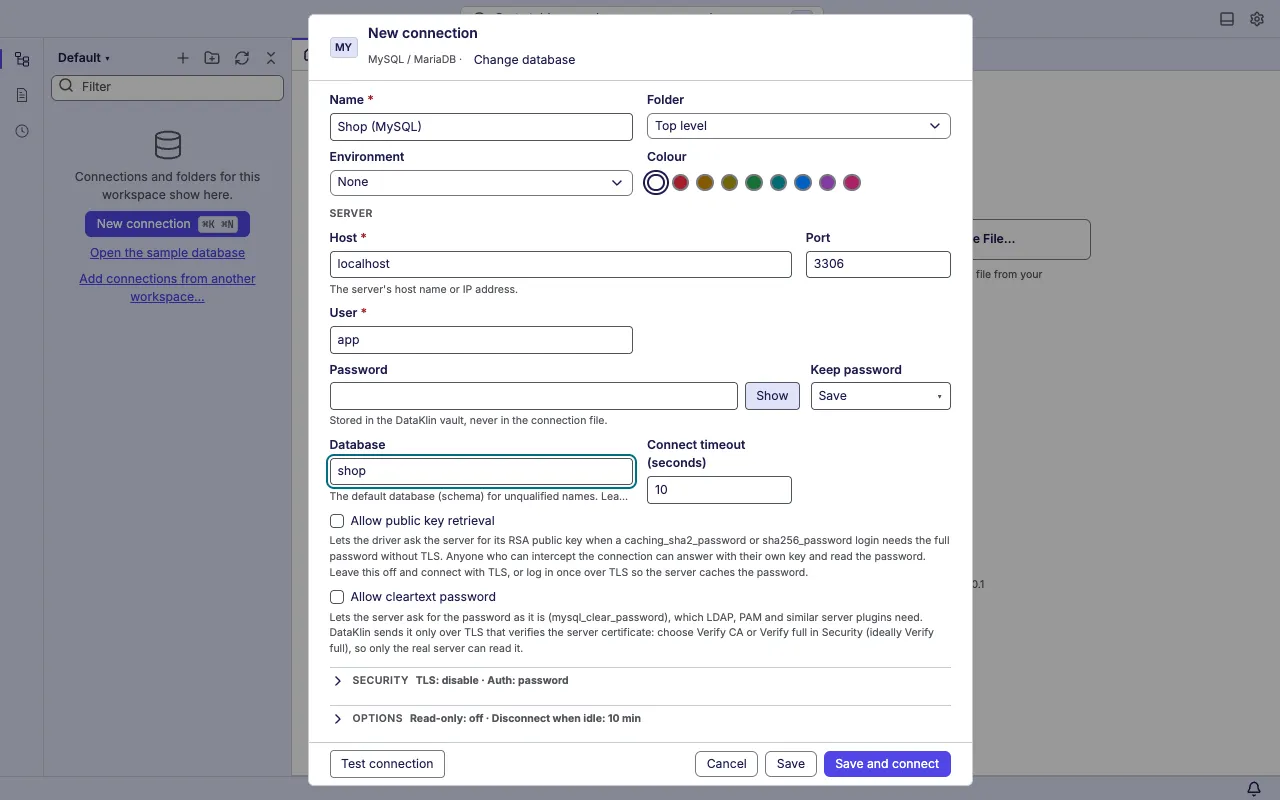
Connection fields
Section titled “Connection fields”The Connection section at the top (Name, Folder, Environment and a color) is the same for every database: see Getting started. The Server and Authentication fields below are MySQL’s own, and all of them are in the dialog’s Server section; the sign-in fields are listed apart. Options is the collapsed section at the bottom of the dialog.
Server
Section titled “Server”| Field | What it does | Default | Example |
|---|---|---|---|
| HostRequired | The server's host name or IP address. | None | db.example.com |
| Port | The TCP port the server listens on. From 1 to 65535. | 3306 | 3306 |
| Database | The default database (schema) for unqualified names. Leave empty to choose none. | None | shop |
| Connect timeout (seconds) | How long to wait for the server before the connection fails. From 1 to 3600. | 10 | 10 |
| Allow public key retrieval | Lets the driver ask the server for its RSA public key when a caching_sha2_password or sha256_password login needs the full password without TLS. Anyone who can intercept the connection can answer with their own key and read the password. Leave this off and connect with TLS, or log in once over TLS so the server caches the password. | Off | Off |
| Allow cleartext password | Lets the server ask for the password as it is (mysql_clear_password), which LDAP, PAM and similar server plugins need. DataKlin sends it only over TLS that verifies the server certificate: choose Verify CA or Verify full in Security (ideally Verify full), so only the real server can read it. | Off | Off |
Authentication
Section titled “Authentication”| Field | What it does | Default | Example |
|---|---|---|---|
| UserRequired | The database user to sign in as. | None | app |
| PasswordPassword auth | Stored in the DataKlin vault, never in the connection file. Shown with the Password authentication method. Next to it, Keep password chooses how long DataKlin keeps it: Save, Until DataKlin quits or Ask every time. | None | — |
Options
Section titled “Options”| Field | What it does | Default | Example |
|---|---|---|---|
| Read-only | Mark this connection as one that should not change data. DataKlin then refuses writes and schema changes before they reach the database. Choosing a protected environment, such as Production, ticks it for you. | Off | On |
| Disconnect when idle | Close this connection after it has sat unused. Reconnects on your next action. Choose Use default, Never, or After… and a number of minutes. | Use default | Never |
Connection string
Section titled “Connection string”Paste a mysql:// URL into the first step of the dialog or into the Host field, and DataKlin offers to fill in the fields from it. Nothing changes until you click Fill fields.
mysql://app@localhost:3306/shopmysql://app@db.example.com/shop- A password in the URL goes into the Password field only, and is never written to a log.
- Query options such as
ssl-modearen’t applied. DataKlin lists each one by name, and calls out those that would read a file or weaken TLS. Set TLS in the Security section instead. - A
mariadb://URL isn’t read: write it asmysql://.
Authentication and TLS
Section titled “Authentication and TLS”Open Security to choose how DataKlin signs in. The Authentication method is one of:
- Password (the default): the User and Password fields. Passwords are kept as Secret storage describes.
- AWS IAM: a short-lived token from your AWS credentials instead of a password, for Aurora and RDS. See AWS IAM authentication and AWS credentials.
- AWS Secrets Manager: the user name and password are read from a secret each time DataKlin connects. See AWS Secrets Manager.
The TLS mode is one of Disable, Require, Verify CA and Full verification. A new connection to a remote host uses Full verification; one to localhost, 127.0.0.1 or ::1 isn’t encrypted. With TLS on you can also choose a CA certificate, a Client certificate, the Server name and the Minimum TLS version. TLS and certificates explains each mode and certificate.
Try it locally
Section titled “Try it locally”No server to hand? Start MySQL in Docker:
docker run --name dataklin-mysql -d -p 3306:3306 \ -e MYSQL_ROOT_PASSWORD=root-password \ -e MYSQL_USER=app -e MYSQL_PASSWORD=app-password -e MYSQL_DATABASE=shop \ mysql:8.4Then connect with these values:
| Field | Value |
|---|---|
| Host | localhost |
| Port | 3306 |
| Database | shop |
| User | app |
| Password | app-password |
| TLS mode | Disable, the default for localhost |
| Allow public key retrieval | On, for this local container only |
The server takes a short while to start, and Test connection fails until it is ready. When you’re done, remove the container with docker rm -f dataklin-mysql. For MariaDB, use an image such as mariadb:11.8 with MARIADB_USER, MARIADB_PASSWORD, MARIADB_DATABASE and MARIADB_ROOT_PASSWORD in place of the MYSQL_ ones.
Good to know
Section titled “Good to know”- Hardened by default.
LOCAL INFILEand multi-statement queries are off. The cleartext password plugin is off too, except for AWS IAM over verified TLS (Verify CA or Full verification) and when you turn on Allow cleartext password. - Public key retrieval. DataKlin doesn’t fetch the server’s RSA public key over an unencrypted connection unless you tick Allow public key retrieval for that connection. A
caching_sha2_passwordorsha256_passwordlogin can need that key to send the password without TLS, but anyone who could intercept the connection could answer with their own key. Turn it on only on a trusted network, or use TLS. - Read-only sessions. On a read-only connection, DataKlin refuses writes and schema changes, and also puts the MySQL session itself into read-only mode. See Read-only connections.
- Destructive statements ask first.
DROP,TRUNCATE, andDELETEorUPDATEwithout aWHEREask for confirmation before they run, and a protected environment such as Production always asks. See Confirming destructive statements. - SQL completion. The console completes schema, table, column and function names as you type. It reads them through the Database Explorer’s own session: it never connects for you and never reads inside your open transaction.
- Cancel. Long queries can be cancelled, and a cancel never reaches the next statement.